Sequencer
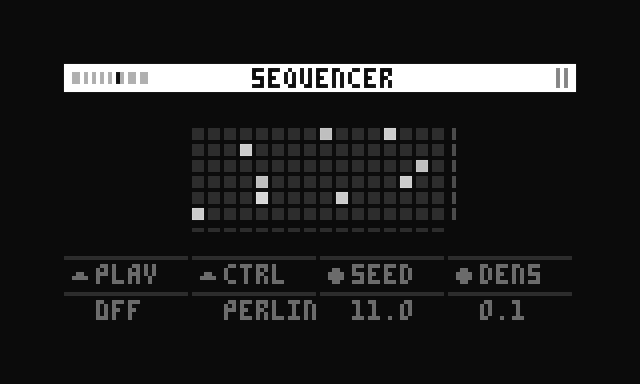
The Sequencer page offers step sequencing for all six voices. By default, steps are generated algorithmically using Perlin noise. This means that the entire pattern can be reshaped at once rather than edited track by track.
Alternatively, the sequence can be edited step by step using monome grid.
The velocity of each step is indicated by the brightness of a step.
The current level of the envelope of each track is indicated by the brightness of the rectangle on the right side of each row.
Controls
| Control | Function | Description |
|---|---|---|
| K2 | Toggle transport on/off | Starts or stops playback. |
| K3 | Control mode | Sets control mode for E2 and E3: perlin, velocity or loop. |
| E2 | Depends on K3 | |
| E3 | Depends on K3 |
Control Modes
There are 3 different control modes for the sequencer, set by K3 (CTRL):
Each is explained below.
Perlin
Assigns E2 and E3 to control seed and density, parameters of the perlin noise sequence.
| Control | Function | Description |
|---|---|---|
| E2 | Seed (0-100) | Controls the |
| E3 | Density (0-1) | Controls the amount of active steps, where 0 always gives an empty sequence and 1 always fills all available steps. |
When a monome grid is used to change the sequence, the seed and density values are set to *, to indicate that they don't currently reflect the active sequence.
When E2 or E3 is touched again, both parameters are read and the sequence is updated accordingly.
Velocity
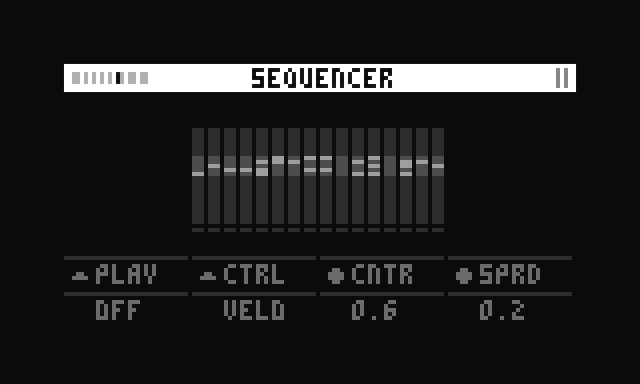
Each step is assigned a 'velocity' (strength of a note/step). While in velocity mode, E2 and E3 control the velocity of all steps at the same time, by defining a range using a center and spread value. The velocities are randomized within this range.
Adjusting center or spread recalculates all velocities. Also, each time a step has been triggered, a new velocity within this range is assigned to this particular step.
In practice, this leads to a continuously evolving pattern, unless spread is set to 0.
| Control | Function | Description |
|---|---|---|
| E2 | Center (0-1) | Controls the center velocity. When set to 0.5, with spread set to 0, all velocities are 0.5. |
| E3 | Spread (0-1) | Controls how far the velocity spreads from the center. When set to 1.0, the range expands up to 0.5 to each side of the center. |
For example:
center = 0.5, spread = 0→ range is 0.5 to 0.5 (all steps get exactly 0.5)center = 0.5, spread = 1→ range is 0 to 1 (full range, centered at 0.5)center = 0.75, spread = 0.5→ range is 0.5 to 1 (spread of 0.5 extends ±0.25 from center)
The output velocity
Where:
= Center value = Spread value is a random number between 0 and 1
Formula
What does velocity control?
Velocity always modulates the amplitude of a triggered sample. That means that at minimum velocity (0.01), the step is almost silent.
If the envelope mode is set to LPG, velocity configures the maximum filter frequency of the low pass gate for that step — the higher the velocity, the brighter the step will sound.
Loop
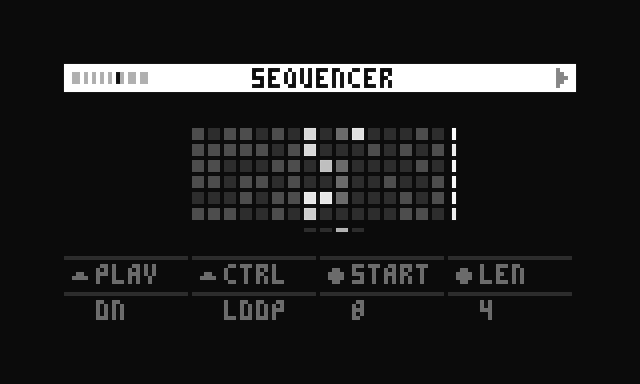
By default, the sequencer loops from step 1 to 16. In Loop mode, this can be changed to loop between any 2 steps.
In order to change the start value, ensure to dial len to a value below 16 first.
| Control | Function | Description |
|---|---|---|
| E2 | Start (1-16) | Sets start step |
| E3 | Length (1-16) | Sets loop length in steps |